Settings for depth uncertainty
With the Depth form (model > 3D Structure > Depth) you parameterize uncertainty for surfaces that are made 'uncertain' on the Define Uncertainty form. In case you chose method SGS, this means you specify one or more variograms, while for Multiplier method you specify one or more probability density functions (PDFs). The stacking strategy (also selected on the Define Uncertainty form) determines whether one, or multiple variograms/PDFs are required; for 'dependent' stacking strategy, only one variogram/PDF is required for all surfaces, while for 'independent' stacking strategy each surface requires its own variogram/PDF. Subsequently, and irrespective of the method and stacking strategy, per surface you define the amplitude of shift (either as a value at one standard deviation, or via a local standard deviation map).
As there are various other controls on the form, some of which might need preparation or consideration beforehand, it is recommended to read the following paragraphs with 'background information' before you start working with the form.

When running a volumetric study with the study strip, per realization a depth shift map is created. This depth shift map represents (for that particular realization) the results, per uncertain surface, of the combined (hierarchically handled) stochastic inputs of the Depth and Thickness (Seismic/Sub-Seismic) input forms.
With the Preview  button on the form you can generate and visualize one (random) shift map, based only on the settings on the 'Depth' form. The purpose of generating and previewing such a depth shift map is to QC the settings you entered on the form (i.e. variogram for SGS or PDF for Multiplier, and the standard deviation for shift) and adapt these settings if necessary.
Once generated with the Preview button on the form, you can find this depth shift map (called ‘Preview Shift Map’, a 2D grid) in the Data > Maps > Depth and Thickness Uncertainty folder (with property 'Depth' representing the depth shift of the surface). When you apply the preview again, or with any of the other forms that have a preview option (i.e. the 'Thickness (Seismic)', 'Thickness (Sub-Seismic)' or 'QC Uncertainty' forms), any existing shift map will be overwritten. Duplicate (or rename) a preview shift map if you want to retain it.
Shift maps that are generated with the Preview button on the form are not used in any way in the volumetric study. You can optionally remove these maps after you have finalized QC-ing your settings.
Amplitude of shift, i.e. the amount you think an interval can shift due to its uncertainty, needs to be specified for each individual uncertain surface. The value(s) you provide on the form under Global standard deviation and Local standard deviation represent the amount of shift at one standard deviation (1 sigma) of the gaussian normal distribution sampled by SGS. Since in a normal gaussian distribution 68.3% of the values lie within one standard deviation of the mean, this means that 68.3% of realizations will lead to less shift than the value(s) you provide on the form, and 31.7% of realizations will lead to more shift than the value(s) you provide on the form.
You can apply a laterally uniform uncertainty for the entire model area (select 'Global') or you can provide a locally varying uncertainty in the form of a prepared/imported map (select 'Local'). In other words, with a 'Local standard deviation map' you can differentiate between areas with low and high uncertainty.
For example: when using 'Global standard deviation' with a value of 10 m, at all locations of the SGS map where 1 sigma is sampled, the surface will shift 10 m. downwards (JewelSuite convention is positive z). When using a 'Local standard deviation map' with values of 5, 10 and 20 m, at all locations where SGS samples 1 sigma, this will result in 5, 10 and 20 m. shift downwards respectively (negative SGS sampling shifts surfaces upwards). For the requirements of a Local standard deviation map, see 'Local standard deviation' below.
To define depth uncertainty
Structural Model At the top of the form, select the Structural Model for which you want to make surfaces uncertain.
Depending on your choice of method, continue reading under 'Define variogram(s) for SGS' or 'Define PDF(s) for Multiplier method':
Before you start:
- If you chose 'Dependent' stacking strategy on the Define Uncertainty form, select All Surfaces in the Uncertain Surfaces table at the left side of the form. This will enable the SGS settings at the right side of the form. Follow the steps below.
- If you chose 'Independent' stacking strategy on the Define Uncertainty form, select a surface in the Uncertain Surfaces table at the left side of the form.
Variogram type Choose a variogram type to control how the variogram model is auto-fitted to the data:
- Exponential
- Gaussian
- Spherical
Major range Specify the distance at which the values become independent (the variogram reaches its plateau). The distance is measured in the direction with the greatest spatial continuity.
Minor range Specify the distance at which the values become independent (the variogram reaches its plateau). The distance is measured in the direction with the least spatial continuity (by definition perpendicular to the major direction).
Azimuth (GN) Enter the azimuth (angle with Northing direction) of the axis corresponding with the major range.
Seed (only for creating a preview map) The seed is only used to generate the preview map with the Preview button on the form. This seed is not used during the Study run. Click on the dice to generate a random seed number for the SGS preview map.
Optional - Click the uncertainty symbol  behind the seed to open a basic Uncertainty Parameter dialog, which displays:
- Name - name of the uncertainty parameter on the Designs form in the study strip. Although not recommended, you can edit the name.
- The reference value is not editable and displays the seed value of the main form.
When you have finished entering the variogram settings, do not forget to repeat the above steps for the other surfaces in the Uncertain Surfaces table on the form (if applicable). When finished, continue with 'Setting the standard deviation' further below.
Before you start:
- If you chose 'Dependent' stacking strategy on the Define Uncertainty form, select All Surfaces in the Uncertain Surfaces table at the left side of the form. This will enable the Multiplier settings at the right side of the form. Follow the steps below.
- If you chose 'Independent' stacking strategy on the Define Uncertainty form, select a surface in the Uncertain Surfaces table at the left side of the form.
Multiplier distribution settings Click on the uncertainty symbol to open the Uncertainty Parameter dialog where you can define the probability density function (PDF) for the multiplier value. This PDF will be sampled for each realization during the study run to obtain a multiplier value. This multiplier value will subsequently be multiplied with the amplitude you enter in the Global or Local standard deviation entry field on the form, to get the final depth shift for that realization.
For example:
- Sampled multiplier value = 0.2. Global standard deviation = 10 m. Shift = 0.2 * 10 = 2 m (*). This means the surface for this realization will be moved 2 m. down (JewelSuite convention is positive z).
- Sampled multiplier value = -0.4. Global standard deviation = 10 m. Shift = -0.4 * 10 = -4 m (*). This means the surface for this realization will be moved 4 m. up (JewelSuite convention is positive z).
(*) Both examples assume that the standard deviation on the Uncertainty Parameter dialog is kept at its default value of 1, see red box in image below.
When you have defined the PDF, you can use the dice  to randomly sample a multiplier value from the PDF (the sampled value is auto-filled in the entry field in front of the uncertainty symbol). The value is used to generate the preview map with the Preview button on the form (see 'Preview' below).
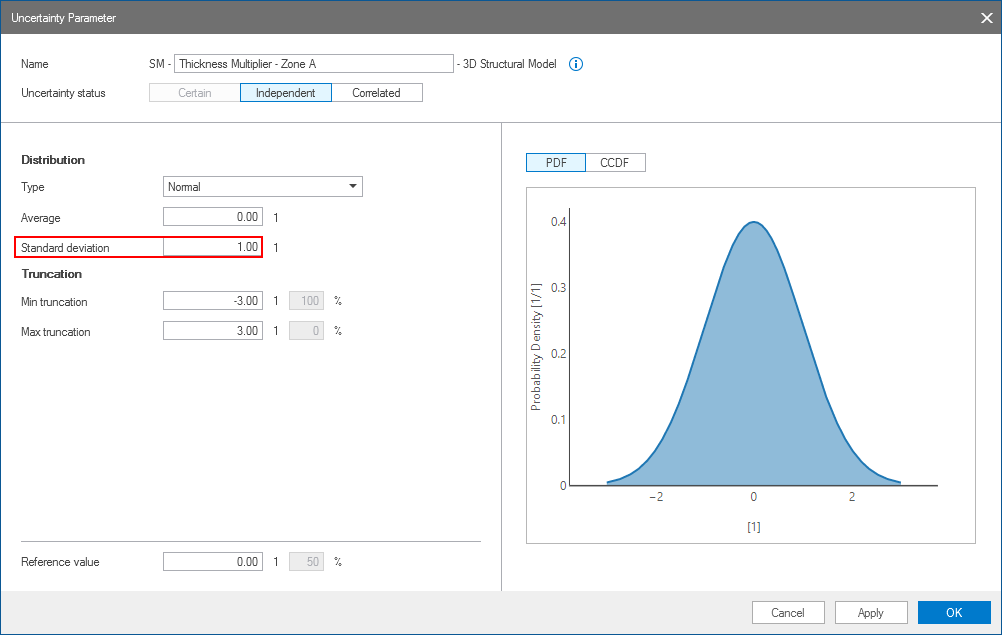
The Uncertainty Parameter dialog. For your own perception it is recommended to keep the standard deviation for Multiplier value at '1' so that when one standard deviation is sampled from the PDF, this results in an amount of shift that you entered for one Global/Local standard deviation on the Depth form. click to enlarge
For a description of the controls of the Uncertainty Parameter dialog, see The Uncertainty Parameter dialog. Here follow some special remarks when this dialog is used in the Depth and Thickness Uncertainty workflo:
- As multiplier values are unit-less this means that the values you enter in the entry boxes on the Uncertainty Parameter dialog are unit-less as well. The amount of shift per realization (e.g. in m or ft) is the Multiplier value (as sampled from the PDF) times the Global/Local standard deviation (as entered on the 'Depth' form) times the standard deviation value in the Uncertainty Parameter dialog (red box in image, default set to 1). It is strongly recommended, for your own perception, to keep this value '1' so that one standard deviation in the PDF equals the amount of shift that you entered for one standard deviation in the Global/Local standard deviation entry field on the 'Depth' form.
- The log-normal distribution (located under 'Distribution') is not available for depth and thickness uncertainty.
- The 'Reference value' has no meaning in the Depth and Thickness Uncertainty workflow. It is the same value as the one in front of the uncertainty symbol on the form, and only used to generate the Preview map.
on the 'Depth' form.In case of 'Independent' stacking strategy, repeat the above steps for all the surfaces in the Uncertain Intervals table at the left side of the form. When finished, continue with 'Setting the standard deviation' below.
Entering shift per standard deviation
For background information, see Global or local standard deviation - background information above.
Select a surface in the Uncertain Surfaces table at the left side of the form. As a next step, you will define the amplitude of shift (e.g. in m or ft). This value represents the amount of depth shift at one standard deviation of the gaussian normal distribution sampled by SGS (e.g. when set at 10 m, then +1 sigma results in 10 m. shift downwards (positive z), -1 sigma results in 10 m shift upwards.
To define the amount of shift, you have two options:
- Global standard deviation Select this option if you want the same level of uncertainty across the model area. This means that over the entire model area, similar SGS sampling will result in similar amount of shift. Enter the shift value (representing the amount of shift at 1 sigma) in the entry field on the form. For example, if you enter 30 m., the surface will shift 30 m. down upon sampling of 1 sigma (assuming you kept Standard deviation at 1 on the Uncertainty Parameter form, see image above).
- Local standard deviation Select this option if you want uncertainty to vary over the model area. This situation often results from lateral variations in the data quality, seismic velocity uncertainty and seismic interpretation quality. With 'local standard deviation' you can define areas with more or less depth shift at similar SGS sampling. To be able to use the 'Local standard deviation' option, you need to provide a 'local standard deviation' map. The values on the map should represent the depth shift at 1 sigma SGS sampling. You can select this map from the drop-down boxes on the form. The map has the following requirements:
- The map has to be in either the Imports folder or the Data folder in the JewelExplorer.
- The map has to be a 2D grid.
- Type = Map.
- The map needs to have a property of the property type = 'Depth' (see Workspace > Property Inspector
 ).
). - The lateral extent of your local standard deviation map needs to be equal or greater than your structural model extent.
You can analytically create such map (with Property Calculator or the Editing Tools > Property Tools) or derive it from supporting data such as seismic attributes.
(Optional) Click Preview to preview the shift map of the surface selected in the 'Uncertain Surfaces' table on the form (for background information, see Previewing depth shift maps - background information above.) Upon clicking:
- A map called 'Preview Shift Map' (a 2D grid) is added to the Data > Maps > Depth and Thickness Uncertainty folder in the JewelExplorer, with the property 'Depth' representing the depth shift.
- You can visualize the map in the Workspace > 2D View and Workspace > 3D View.
Apart from the 'Depth' property, the depth shift map also contains the following properties:
- Property 'Depth uncertainty method values' - For SGS, this is the normalized depth shift map generated by SGS and before multiplication with your global or local standard deviation (the property is unit-less with standard deviation = 1 and mean = 0). For Multiplier method, this is the sampled multiplier value (the property is unit-less with standard deviation as specified on the Uncertainty Parameter dialog, see image above).
- Property 'Depth standard deviation' - This is the standard deviation map, displaying either the global standard deviation value or the local standard deviation map as provided by you. This property is in SI units.
In case of 'Independent' stacking strategy, repeat the above steps for all the surfaces in the Uncertain Intervals table at the left side of the form.
When you have completed the settings on the form, click Apply or OK at the base of the form. On the Designs form of the Volumetrics Study workflow of the study strip, the uncertainty parameters will appear with the following name convention:
- Depth Multiplier - <name of the surface> - <name of the structural model>
- Depth SGS Seed - <name of the surface> - <name of the structural model>